
What File Format and Size Are Required for Professional Book Printing?
Preparing to send out your manuscript for printing? Make sure to export your interior pages and cover artwork into press-ready files with appropriate bleed lines, color conversions, vector fonts, and correct dimensions.
Prepare High-Resolution Files For Professional Results
You have invested several months working on your book, revising every single sentence, and designing the perfect cover page for your book. It’s time for you to see the result of all your hard work; you will be sending your book to the printer soon.
Have you ever thought about why there are some books that look very sharp and professionally done while other books seem to be blurry or poorly cropped? The difference is not only in the content, but in the technical readiness of your digital files.
Professional printing requires adherence to industry standards for your concept to be executed flawlessly on the paper. Knowing these technical considerations in advance will save time and ensure that your finished project matches your expectations.
Partner With Trusted Book Printing Specialists
Selecting a good service provider is the first and foremost thing when getting ready for professional production. Good quality book printing Canada uses digital workflows that are standardized to handle your material efficiently.
Providing the file in the right industry standard format will help the specialists to avoid spending any time debugging the file.
Always refer to their submission instructions, as professional printers usually need files that have certain parameters like page size, resolution, and color mode set correctly.
Starting from the point where you know your printer’s technical specifications will surely help you in getting a retail-quality book.
Export Your Content As High-Resolution PDF
In the professional printing business, the internationally recognized format is PDF. In contrast to Word documents, which can change their layout and font style depending on the device that opens them, a PDF keeps everything exactly as you have set it out.
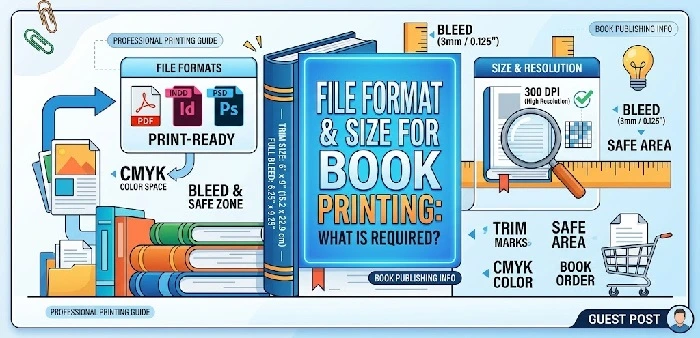
The recommended format for exporting is either PDF/X-1a or High Quality Print. This guarantees that all fonts are embedded, and images are set at a minimum of 300 DPI (dots per inch), which is the highest quality required to avoid any blurring.
Select Standard Sizes For Optimal Readability
Selecting the size of the book becomes an artistic as well as practical exercise. Although any size of the book can be printed, a standard size saves money and is easier for the reader.
5.5 x 8.5 inches is the most popular book size when it comes to fictional books. For books like textbooks, an 8.5 x 11-inch book is recommended due to its space for diagrams.
It is always recommended that you confirm the trim size with the printing partner you have selected before finishing the layout process, since custom sizes may entail additional production expenses.
Include Bleed Areas For Full-Page Designs
If your book design has any graphics or color that touches the edge of the page, then there needs to be a bleed. This is an extra margin added around the outside of your pages (usually 0.125 inches).
In the process of binding, the industrial cutters cut the edges of paper to provide neat results. Without this extra margin, you will have unsightly white lines along the edge of your pages.
Be sure that your design software includes bleed settings so that your art extends to the trimmed edge without any gaps.
Set Correct Color Modes For Vibrant Printing
Color on computer monitors is made up of Red, Green, and Blue (RGB) light, while printing machines in professional settings utilize Cyan, Magenta, Yellow, and Black (CMYK) inks.
Submitting an RGB file will make the picture appear washed out or distorted since the printer is attempting to reproduce the light-based colors of the computer screen with ink.
To achieve the best results for your photos and graphics, convert all files into the CMYK color format before exporting your PDF.
Most commercial design programs perform this task automatically, but verifying your final output file ensures that there will be no accidental color changes that may occur during this process.
Professional Standards For Notebook Printing
Elevate your business or personal projects with top-notch custom notebook printing services that convert your simple concepts into professionally designed keepsakes.
Aside from design, industry experts consider three key technical specifications: paper weight, binding strength, and margin allowance.
Using 80-100 GSM paper helps to avoid ink penetration, and choosing the right type of binding, such as lay-flat coils, improves comfort during the writing process.
Designers should also consider the gutter margin inside the page; a 0.25-inch margin allows text to be readable, ensuring your customized stationery is both functional and aesthetically pleasing.
FAQs
What sizes are books typically printed in, A5 or A4?
A5 (5.8 x 8.3 inches) is commonly used for novels or trade paperbacks due to its portability. On the other hand, A4 (8.3 x 11.7 inches) is used for magazines, textbooks, and catalogs where bigger dimensions are required for visual purposes.
Which is the best size for printing books?
It highly depends on the genre of the book. The industry standard for comfortable reading for a fiction book is 5.5 x 8.5 inches. For non-fiction books and professional-looking publications, 6 x 9 inches is used. As for workbooks and technical manuals, the best size would be 8.5 x 11 inches.
Which file format is used by book printing services?
Professional book printing services use only one type of format, which is PDF (Portable Document Format). More precisely, PDF/X-1a is the best choice for professional book printing because fonts are embedded and colors are locked to the CMYK spectrum of colors.
Which is better for printing, a PDF or a PNG?
PDF is much better for printing. PNG format is meant for websites and does not have any of the color profiles and bleeds that you will need on a professional printing press. The PDF format will allow you to use vector graphics and professional color management, so your text will be sharp, and your pictures will have good resolution.
In what format are most books printed?
The vast majority of books are printed in PDF format. This type of format supports the proper bleed settings for professional printing, as well as embedded fonts and trim marks so that your pages will be cut properly.
Conclusion
Professional printing of books starts long before the printing machine starts to work.
Selecting the right file format, page dimensions, image quality, margin, and other settings will help ensure that the final book is of good quality based on the author’s effort. Such preparation will avoid unnecessary expenses and time wastage during the whole printing process.
Through an understanding of the fundamental aspects of printing and collaboration with printing experts, authors will be able to write books that will be appealing, enjoyable, and leave a lasting impression on all readers.